
Why Your Website Isn’t Generating Leads: 15 Common Mistakes Indian Businesses Make (And How to Fix Them)
Many business owners believe that once a website goes live, enquiries will automatically start coming in. Unfortunately, that’s rarely how it works.
A website is more than an online brochure. It is often the first impression your business makes and should function as your best salesperson—available 24 hours a day. If visitors leave without contacting you, downloading a brochure, or making a purchase, your website isn’t doing its job.
Across India, thousands of businesses spend money on website development, SEO, Google Ads, and social media marketing but still struggle to generate quality leads. The problem usually isn’t the traffic. More often, it’s the experience visitors have after they land on the website.
The good news is that most lead generation problems are fixable.
Let’s look at the 15 most common mistakes that prevent websites from converting visitors into customers—and what you can do to fix them.
1. Your Value Proposition Isn’t Clear
Visitors decide within a few seconds whether your business is relevant to them.
If your homepage opens with generic statements like “Welcome to Our Company” or “We Provide Quality Services,” you’re missing an opportunity.
Instead, answer three questions immediately:
- What do you offer?
- Who is it for?
- Why should someone choose you?
A clear headline and supporting message help visitors understand your business instantly.
Example:
Instead of:
“Welcome to ABC Solutions.”
Try:
“Helping Small Businesses Grow with SEO, Google Ads and High-Converting Websites.”
2. Slow Website Speed
People are impatient online.
If your website takes several seconds to load, many visitors will leave before reading a single line.
Slow-loading pages also affect Google rankings, making it harder for potential customers to find you.
How to fix it
- Compress images.
- Use modern image formats.
- Enable browser caching.
- Remove unnecessary plugins.
- Choose reliable website hosting.
Even improving loading time by a couple of seconds can significantly improve user engagement.
3. Your Website Isn’t Mobile Friendly
Most Indian users browse websites on smartphones.
If visitors have to zoom, scroll sideways, or struggle to click buttons, they’ll likely leave and visit a competitor instead.
A mobile-friendly website should have:
- Responsive design
- Readable fonts
- Clickable buttons
- Fast loading pages
- Easy navigation
Always review your website from a mobile user’s perspective.
4. Weak or Missing Calls-to-Action
Many websites explain services well but never tell visitors what to do next.
If there isn’t a clear action to take, people simply leave.
Good calls-to-action include:
- Get a Free Consultation
- Request a Quote
- Book a Demo
- Download Our Brochure
- Talk to an Expert
Make these buttons visible throughout the website rather than hiding them at the bottom of a page.
5. Too Much Information on Every Page
Visitors don’t read websites word by word.
They scan.
Large blocks of text, complicated language, and cluttered layouts make it difficult to find important information.
Instead:
- Keep paragraphs short.
- Use descriptive headings.
- Add bullet points.
- Highlight key benefits.
Simple content is easier to understand and keeps visitors engaged.
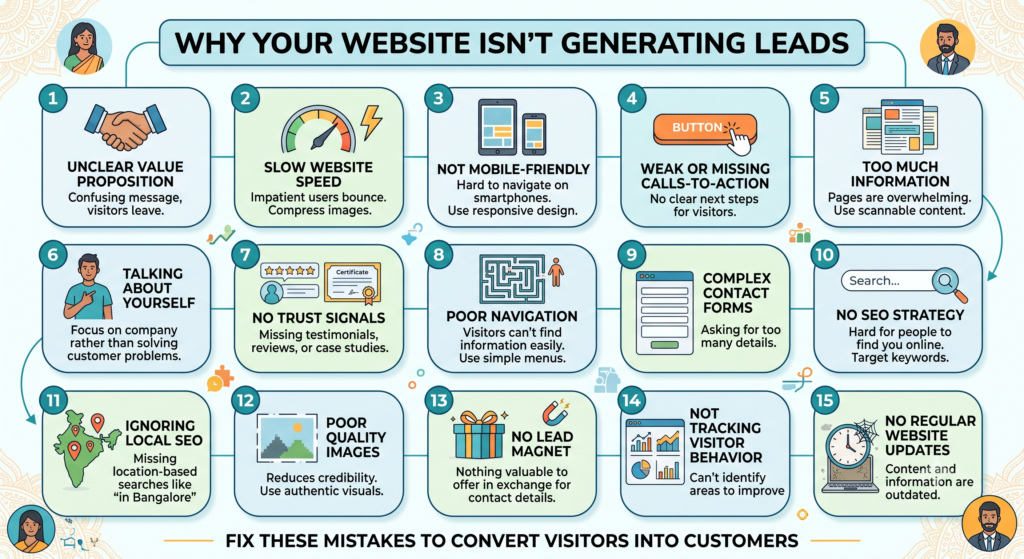
6. You’re Talking About Yourself Instead of the Customer
Many websites focus entirely on company achievements.
“We have 20 years of experience.”
“We are industry leaders.”
“We offer premium services.”
Customers care less about your company and more about solving their own problems.
Shift your messaging from “we” to “you.”
Explain how your services save time, reduce costs, increase sales, or solve specific business challenges.
7. No Trust Signals
People hesitate to share their contact details with businesses they don’t trust.
Trust is built through proof.
Include elements like:
- Client testimonials
- Google Reviews
- Case studies
- Awards
- Industry certifications
- Client logos
- Years of experience
Social proof reassures visitors that others have successfully worked with you.
8. Poor Navigation
Visitors should never have to guess where information is located.
Confusing menus create frustration.
Your navigation should be simple and organised.
Essential pages include:
- Home
- About
- Services
- Industries
- Blog
- Contact
If users can’t find what they’re looking for within a few clicks, they often leave.
9. Contact Forms That Ask Too Much
Long forms discourage enquiries.
If you’re asking visitors for ten different details before they’ve even spoken to you, many won’t bother.
For most businesses, a lead form only needs:
- Name
- Phone Number
- Message
You can always gather more information during the conversation.
10. No SEO Strategy
Even the most attractive website won’t generate leads if people can’t find it.
Many websites launch without proper keyword research or optimisation.
Every important page should target a specific search intent.
Optimise:
- Page titles
- Meta descriptions
- URLs
- Heading structure
- Internal links
- Image alt text
Publishing helpful blog content regularly also improves visibility over time.
11. Ignoring Local SEO
Many businesses serve customers within a specific city but fail to optimise for local searches.
Instead of targeting only broad keywords, include location-based phrases naturally.
Examples:
- Digital Marketing Agency in Kolkata
- SEO Services in Bangalore
- Interior Designer in Pune
Also keep your Google Business Profile updated with accurate information, reviews, and recent photos.
12. Poor Quality Images
Low-resolution or irrelevant stock photos reduce credibility.
Whenever possible, use authentic visuals.
Consider adding:
- Office photographs
- Team members
- Product images
- Project photos
- Behind-the-scenes content
Real images create a stronger connection with visitors than generic stock photography.
13. No Lead Magnet
Not every visitor is ready to buy today.
That doesn’t mean they’re not interested.
Offer something valuable in exchange for contact details.
Examples include:
- Free website audit
- SEO checklist
- Digital marketing guide
- Industry report
- Cost calculator
Lead magnets help build your email list and create opportunities for future follow-up.
14. You Aren’t Tracking Visitor Behaviour
Many businesses have no idea what happens after visitors arrive.
Questions worth answering include:
- Which pages receive the most traffic?
- Where do visitors leave?
- Which forms generate enquiries?
- Which marketing channels perform best?
Tools such as Google Analytics and heatmaps help identify opportunities to improve conversions.
Making decisions based on real user behaviour is far more effective than relying on assumptions.
15. No Regular Website Updates
A website should evolve alongside your business.
Outdated blogs, old service pages, broken links, expired offers, and obsolete contact information reduce credibility.
Review your website regularly by:
- Updating service information
- Publishing fresh blog articles
- Refreshing images
- Fixing broken links
- Improving older pages
Search engines also favour websites that remain active and relevant.
A Simple Website Conversion Checklist
Before investing more money in advertising, review your website using this checklist.
✅ Clear headline explaining your business
✅ Fast loading pages
✅ Mobile-friendly design
✅ Strong calls-to-action
✅ Easy navigation
✅ Customer-focused messaging
✅ Testimonials and reviews
✅ Simple enquiry forms
✅ SEO-friendly content
✅ Local search optimisation
✅ Professional visuals
✅ Valuable lead magnet
✅ Analytics installed
✅ Updated content
If several of these items are missing, your website is likely losing potential customers every day.
Final Thoughts
Generating more leads isn’t always about increasing your marketing budget. In many cases, it’s about making your website work harder for the visitors you already have.
Small improvements—such as clarifying your message, simplifying your contact forms, improving page speed, or adding stronger calls-to-action—can have a meaningful impact on enquiries and conversions over time.
Remember, your website should do more than simply exist. It should educate visitors, build confidence, answer their questions, and encourage them to take the next step.
Instead of asking, “How can I get more traffic?” ask yourself, “How can I help more visitors become customers?”
That shift in focus often delivers better results than spending more on advertising.
Frequently Asked Questions (FAQs)
Why is my website getting traffic but no enquiries?
Common reasons include unclear messaging, weak calls-to-action, poor user experience, slow loading speed, lack of trust signals, or content that doesn’t match what visitors are searching for.
How long does it take for a website to start generating leads?
If your website is properly optimised and supported by SEO or paid advertising, you may start seeing enquiries within a few weeks. Sustainable organic lead generation typically builds over several months.
Is SEO enough to generate leads?
SEO helps attract relevant visitors, but conversions depend on the quality of your website. A well-designed, trustworthy, and user-friendly website is essential for turning visitors into enquiries.
Should I redesign my website if it isn’t generating leads?
Not always. Many websites can improve significantly through better content, clearer calls-to-action, faster performance, and conversion optimisation without requiring a complete redesign.
How often should I update my website?
Review your website every quarter. Update service pages as your offerings evolve, publish fresh blog content regularly, and check for broken links or outdated information to keep the site useful for both visitors and search engines.
Google Ads or Meta Ads- Can’t Decide? Read More : Google Ads Vs. Meta Ads & Google Analytics(GA4)